


How to Recover an Old Snapchat Account (2026 Complete Guide)
Losing access to an old Snapchat account can be frustrating, especially if the account contains important memories, photos, chats, or personal content. Many users forget their passwords, lose access to old phone numbers, change email addresses, or even discover their account has been locked or hacked.
Fortunately, there are still several ways to recover an old Snapchat account depending on your situation.
In this complete beginner-friendly guide, you will learn:
- How to recover an old Snapchat account
- How to reset your Snapchat password
- How to recover Snapchat without email or phone number
- What to do if your account is locked
- How to recover a hacked Snapchat account
- How to contact Snapchat Support
- Common recovery problems and solutions
- Tips to secure your account after recovery
This guide follows updated 2026 Snapchat recovery methods.
Why People Lose Access to Snapchat Accounts
There are many reasons users lose access to their Snapchat accounts.
Common causes include:
- Forgotten password
- Lost phone number
- Old email address
- Hacked account
- Account temporarily locked
- Deleted Snapchat app
- Long inactivity
- Device changes
- Login verification issues
Fortunately, Snapchat still provides several account recovery options.
Can You Recover an Old Snapchat Account?
Yes — in many cases you can recover an old Snapchat account if:
- The account still exists
- You know the username
- You still have access to the email or phone number
- The account was not permanently deleted
Recovery becomes harder if:
- The account was deleted permanently
- You lost all recovery methods
- Snapchat permanently banned the account
Method 1 — Recover Snapchat Using “Forgot Password”
This is the easiest recovery method.
Step 1 — Open Snapchat
Open the Snapchat app on your phone.
Or visit:

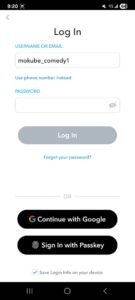
Step 2 — Tap “Forgot Your Password?”
On the login screen:
- Tap:
“Forgot your password?”
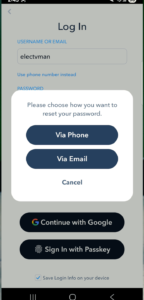
Snapchat will ask how you want to recover your account.
Step 3 — Choose Recovery Method
You can recover using:
- Phone number
- Email address
Choose the option you still have access to.
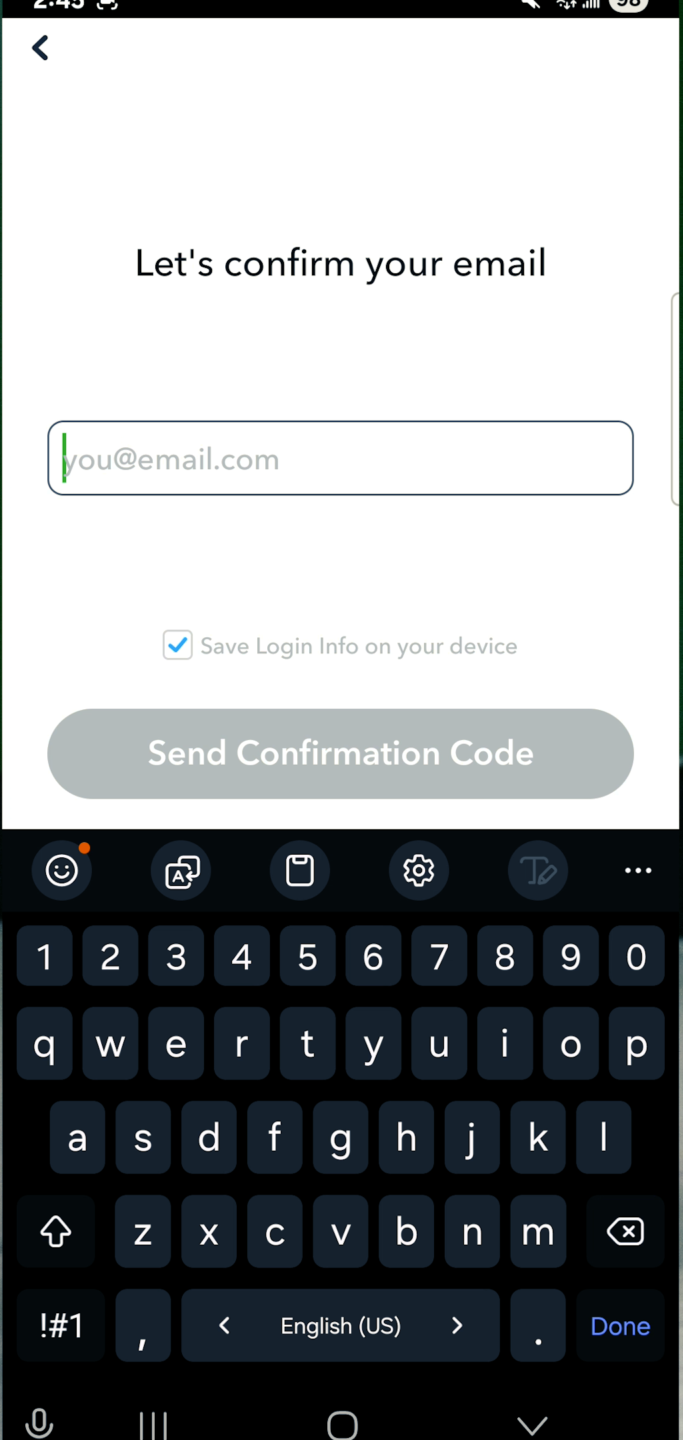
Step 4 — Verify Your Identity
Snapchat may send:
- Verification code
- Password reset link
Enter the code or open the email link.
Step 5 — Create a New Password
Choose a strong password that includes:
- Uppercase letters
- Numbers
- Symbols
Avoid using old passwords.
Step 6 — Login Again
Return to the login page and sign in using your new password.
Done!
Your Snapchat account should now be recovered.
How to Recover Snapchat Using Email Address
If you still have access to your old email, recovery becomes much easier.
Steps
- Open Snapchat login page
- Tap:
“Forgot Password?” - Select:
“Via Email” - Enter your email address
- Open the recovery email
- Click the reset link
- Create a new password
After resetting the password, login again.
How to Recover Snapchat Using Phone Number
If your Snapchat account is connected to a phone number, you can recover it using SMS verification.
Steps
- Open Snapchat
- Tap:
“Forgot Password?” - Choose:
“Via Phone” - Enter your number
- Receive verification code
- Enter the code
- Reset password
This is one of the fastest recovery methods.
How to Recover Snapchat Without Email or Phone Number
This is one of the hardest situations, but there are still some things you can try.
Try Remembering Old Recovery Information
Try:
- Old passwords
- Previous phone numbers
- Old email accounts
- Backup emails
Many users eventually recover access by remembering older login details.
Check Saved Passwords
Your browser or phone may have saved your Snapchat password.
Check:
- Google Password Manager
- Apple Keychain
- Browser saved passwords
Google Password Manager
Open:
Search for:
Snapchat
Apple Passwords
On iPhone:
- Settings
- Passwords
- Search Snapchat
You may find your old login credentials saved there.
How to Recover a Locked Snapchat Account
Sometimes Snapchat temporarily locks accounts for security reasons.
This may happen because of:
- Suspicious activity
- Third-party apps
- Spam behavior
- Too many login attempts
Unlock Snapchat Account
Open:
Login to your account.
If eligible:
- Tap:
Unlock
Then wait a few minutes before trying to login again.
Important Warning About Third-Party Apps
Snapchat often locks accounts that use:
- Unauthorized plugins
- Snapchat mod apps
- Fake Snapchat tools
Avoid:
- Snapchat++
- Phantom
- Unofficial Snapchat apps
These apps may:
- Trigger account bans
- Steal your information
- Compromise your account security
How to Contact Snapchat Support
If recovery methods fail, contact Snapchat Support directly.
Open:
You can submit:
- Recovery requests
- Hacked account reports
- Locked account appeals
Information Snapchat May Request
Snapchat may ask for:
- Username
- Email address
- Phone number
- Device information
- Approximate account creation date
Provide accurate information to improve recovery chances.
Can Deleted Snapchat Accounts Be Recovered?
It depends.
Snapchat usually allows a short recovery period after account deletion.
If the account was recently deleted:
- Login again within the recovery period
After permanent deletion:
- Recovery may become impossible
How Long Does Snapchat Keep Deleted Accounts?
Snapchat typically keeps deleted accounts temporarily before permanent removal.
After permanent deletion:
- Messages
- Friends
- Memories
- Account data
may no longer be recoverable.
Common Snapchat Recovery Problems
Verification Code Not Arriving
Try:
- Checking spam folder
- Restarting phone
- Waiting a few minutes
- Verifying internet connection
Forgot Username
Try:
- Searching old emails
- Asking friends
- Checking old screenshots
Your friends may still see your username in their friend list.
Email Address No Longer Exists
Try recovering the email account first before recovering Snapchat.
Account Keeps Getting Locked
Possible causes:
- VPN usage
- Suspicious activity
- Unauthorized apps
- Too many login attempts
Tips to Protect Your Snapchat Account
After recovering your account, secure it properly.
1. Enable Two-Factor Authentication
This adds additional login protection.
2. Use a Strong Password
Avoid:
- Simple passwords
- Reused passwords
3. Avoid Third-Party Apps
Only use the official Snapchat app.
4. Keep Recovery Email Updated
Always maintain access to:
- Email address
- Phone number
5. Monitor Login Activity
Watch for suspicious login notifications.
For more Snapchat tutorials, social media tips, and tech guides, visit: Elec tv
